Growth & Automation
Write copy with AI Studio
On-brand blog posts, product copy, emails, captions and idea calendars in ten languages.
- 1
Save your brand voice first
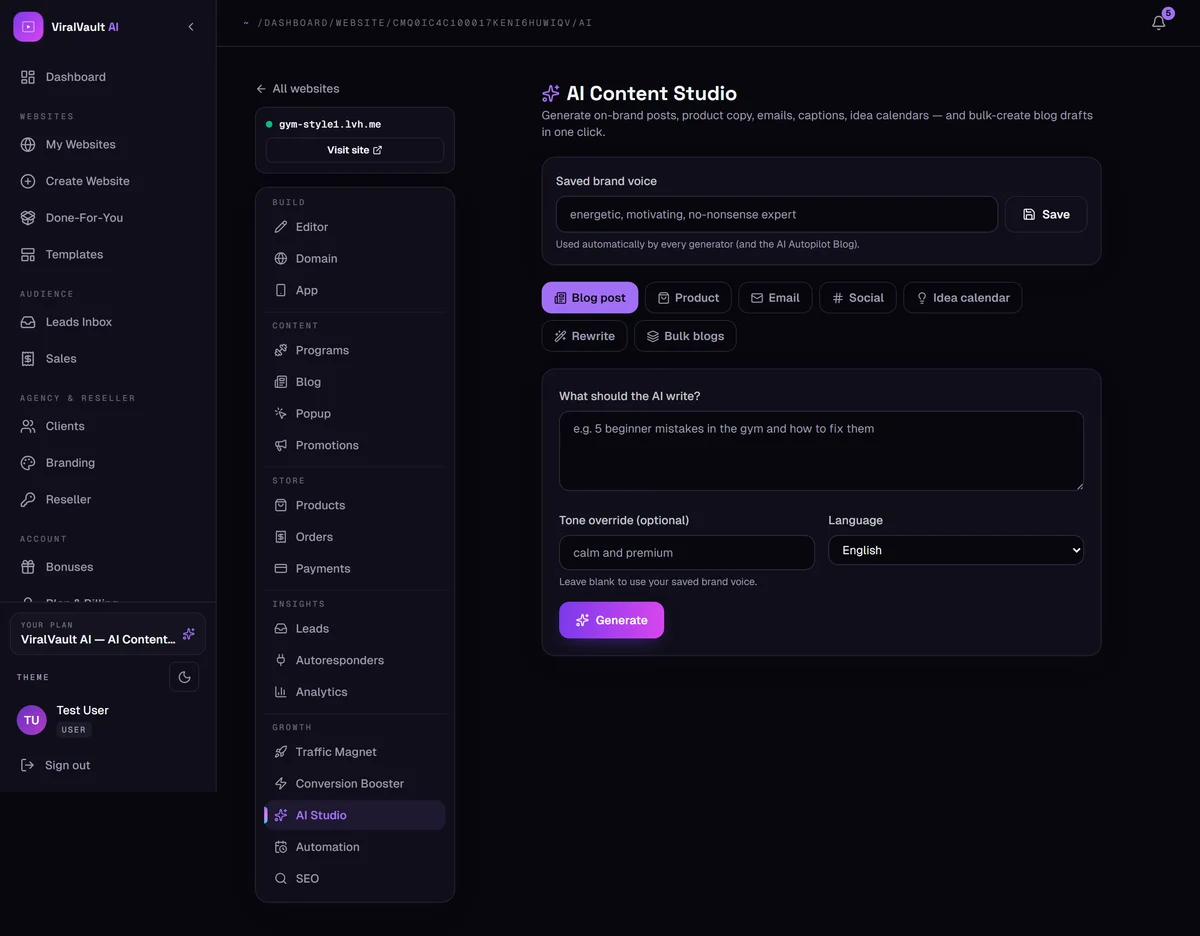
Open Growth → AI Studio and fill in Saved brand voice, then press Save. Describe how you sound — blunt and technical, warm and encouraging, whatever fits.
This is used automatically by every generator, including the AI Autopilot Blog, so setting it once fixes the tone everywhere.
- 2
Pick what to generate
Six generators: Blog post, Product, Email, Social, Idea calendar and Rewrite. Choose one, describe what you want in the prompt box, and generate.
- 3
Override the tone per piece
Tone override changes the voice for one generation only — useful for a serious announcement on an otherwise playful site. Leave it blank to use your saved brand voice.
- 4
Write in ten languages
English, Spanish, French, German, Portuguese, Italian, Hindi, Arabic, Indonesian and Dutch.
- 5
Bulk-create drafts
The blog generator can produce several drafts in one click. They land in Content → Blog as drafts — read them, edit them, then publish. Don't publish AI drafts unread.