Growth & Automation
Get found on Google
Control your search and social preview, and work the on-page checklist.
- 1
Open Growth → SEO
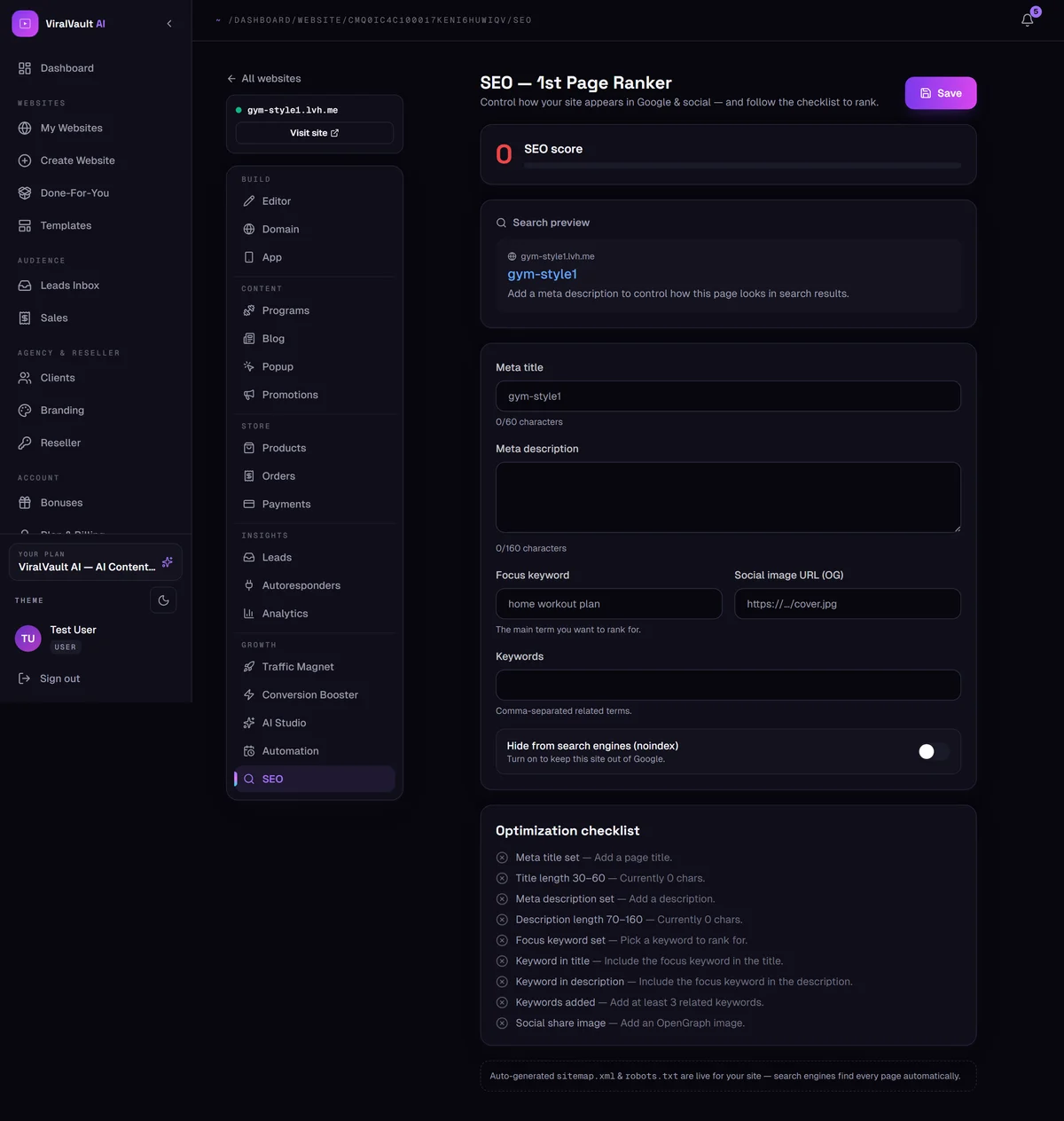
The SEO score at the top grades your current setup, and the search preview underneath shows exactly how your site will look in Google results.
- 2
Meta title and description
The meta title has 60 characters and the description 160 — both count down as you type. Stay inside them or Google truncates your text mid-sentence.
Write the description as an advert, not a summary: it's what convinces someone to click your result instead of the one above it.
- 3
Focus keyword
Set the single main term you want to rank for, and add related terms under Keywords. One clear focus beats a long list of vague ones.
- 4
Social image
The Social image URL (OG) is the picture shown when your link is pasted into WhatsApp, Facebook, X or LinkedIn. Without it you get a blank card, which nobody clicks.
- 5
Work the checklist
The optimization checklist lists what's still missing and links you to the page that fixes each item. Clear it top to bottom.
- 6
Sitemap and robots are automatic
Your
sitemap.xmlandrobots.txtare generated and kept live for you, so search engines find every page without any setup.There's also a Hide from search engines (noindex) switch — leave it off unless you deliberately want the site kept out of Google.